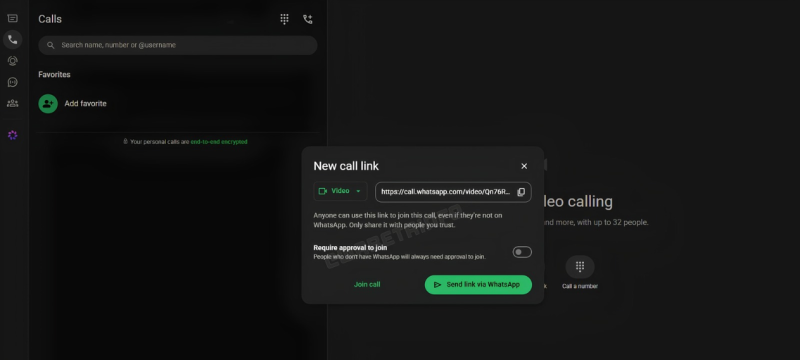
WhatsApp has introduced a guest calling feature that allows people to join calls without creating an account. The new option aims to make communication easier for users who do not use the messaging platform.
The feature allows WhatsApp users to invite friends, colleagues, classmates, and other contacts through a call link. Guests can join calls using a computer browser without installing the app or registering an account.
According to the company’s official statement, the feature supports free, end-to-end encrypted calls without time limits. This means participants can continue conversations without interruptions caused by fixed call durations.
The update could benefit people who need to attend online meetings, study sessions, or personal conversations. It also removes the need for every participant to have a WhatsApp account.
WhatsApp Guest Calling Includes Security Controls
Although the feature allows people without accounts to join calls, WhatsApp has introduced several controls to protect participants. Every guest must receive approval from the call host before entering a conversation.
When guests open a call link, they enter a waiting room. They can join the call only after the host allows them to enter.
Hosts can also remove guests from a call whenever necessary. These controls give call organisers greater control over who participates in conversations.
WhatsApp has also placed limits on what guests can do during calls. Guest participants cannot view other participants’ phone numbers or send messages through the platform. They also cannot directly add other people to the conversation.
These restrictions help maintain privacy while allowing people without accounts to communicate with existing WhatsApp users.
How to Start a WhatsApp Guest Call
Starting a guest call is a straightforward process for people with an active WhatsApp account. Users can follow a few simple steps to create and share an invitation link.
First, open WhatsApp and navigate to the Calls tab. Then, select the plus icon and choose the option to create a call link.
Once the link is generated, share it with the people you want to invite. Recipients can open the link in their computer browser and enter their names.
After submitting their names, guests will wait for the host’s approval. Once admitted, they can participate in individual or group calls.
The feature supports group conversations with up to 32 participants. However, only users with a WhatsApp account can create call links and invite guests.
Screen Sharing and Other Calling Features Available
Guests can also access several essential calling features after joining a conversation. These options allow participants to communicate and collaborate more effectively.
For example, users can share their computer screens to review documents, presentations, or other materials. This capability could prove useful during online classes, tutoring sessions, and workplace discussions.
Participants can also react using emojis, including thumbs-up and heart reactions. They can raise their hands to signal that they want to speak during a conversation.
The addition of guest calling expands WhatsApp’s options for connecting people across different devices and accounts. It could make joining online conversations more convenient for occasional users and people unfamiliar with the platform.
By combining account-free access with host approval and end-to-end encryption, WhatsApp aims to make calls more accessible while maintaining important privacy controls.
In other news read more about: WhatsApp Introduces Shortcuts for Faster Status Updates